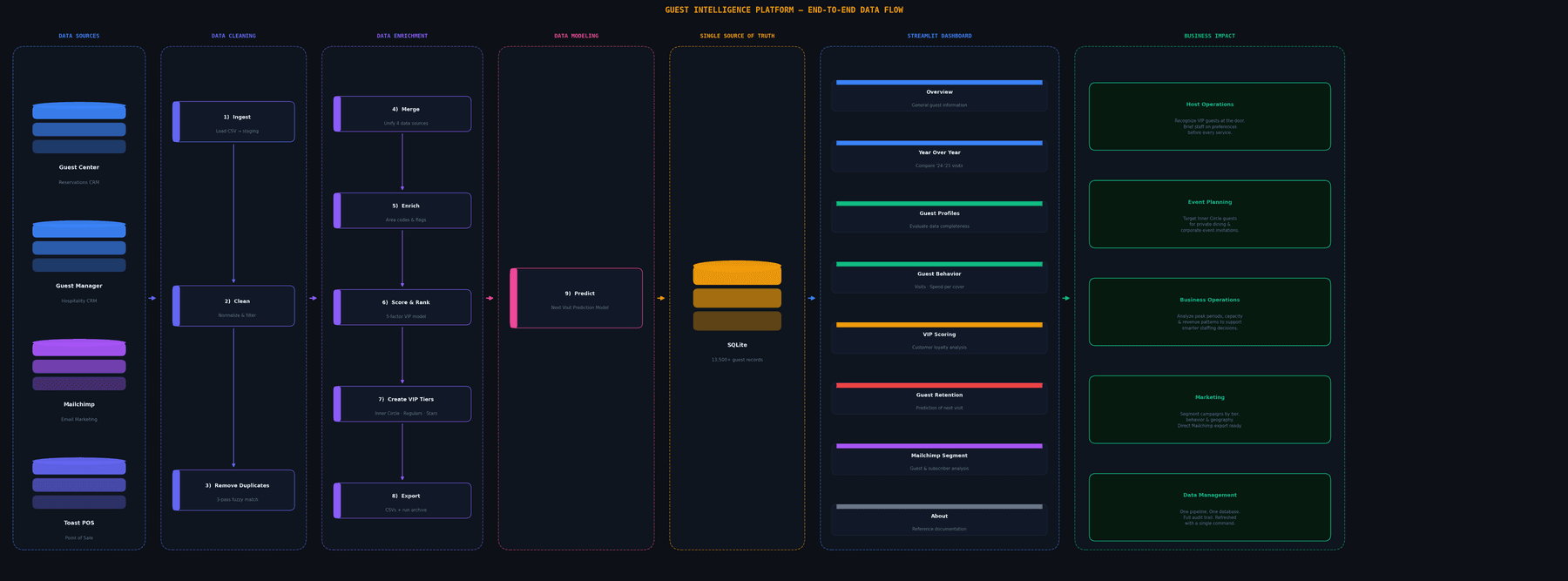
The client wanted to better understand his guests' behavior and preferences to run targeted marketing campaigns, better serve his customers, and improve restaurant operations. During a five-day sprint working onsite, I conducted site visits and staff interviews, audited four data source systems, and built a guest intelligence dashboard merging them into one authoritative database.
NOTE: The data used in this presentation are synthetic to preserve confidentiality.
Section 01
The Problem
44,874 guest records siloed in 4 datasets.
The client, who recently took ownership of the restaurant, saw an opportunity to grow revenue by improving operations and deepening his understanding of his guests' preferences. He asked me to conduct a data audit and build a dashboard that could surface insights into guest profiles. There were good data sources, but they existed in disconnected systems with no shared logic. The data could not answer a basic question: who are the regulars.
The data sources:
- OpenTable's GuestCenter and GuestRelations datasets held 44,874 guest records.
- Toast had point-of-sale history going back years.
- Mailchimp had 140 subscribers.
None of these systems had ever been joined, and staff had no reliable way to distinguish between regulars and one-time diners. In addition, there were major data gaps: 95% of critical fields in GuestCenter were empty: birthdays, anniversaries, seating preferences, and dietary notes. The records existed but were mostly blank.
The project turned the siloed, incomplete data into a single source of truth database organized into themed tabs, each designed to answer a specific question for the owner, staff, or marketing team.
Dashboard: Overview Tab
Section 02
Dashboard Design & Layout
Information organized into theme tabs. Global and local filters provide users easy tools to find market segments.
The left sidebar controls the global filter. Users can select guests by active-since date, minimum and maximum visit count, VIP tier, and geography. Any change to the sidebar updates every chart, table, and metric on the current tab simultaneously. It is the primary way the operator focuses the analysis on a specific guest segment.
Overview
The first tab shows the general information at a glance: total guests, VIP counts by tier, Mailchimp subscriber count, and one-time visitor share. Below the headline numbers, interactive histograms describe the guests three main variables: visit frequency, total spend and average days between visits. The distributions visualize the trends and behaviors of the guests over the past two years. A geographic map shows where guests come from based on phone area codes, and a guest acquisition timeline tracks when current guests first visited. At the bottom of the page, a full guest list can be exported as a CSV or just the names and emails.
Overview Tab
Year Over Year
This tab compares guest acquisition and cohort behavior between 2024, 2025, and the beginning of 2026. The operator can subselect VIP tiers, states, or area codes from the filter dropdowns. The charts show new guest acquisition by month, one-year retention rates by cohort, VIP tier distribution by acquisition year, and a holiday first-timer analysis that counts guests whose first visit fell within three days of major holidays. This tab is used to track performance on key dates such as holidays and special events.
Year Over Year Tab
Guest Profiles
The Guest Profiles tab tracks how complete guest records are filled in across four field categories: identity (name, contact, birthday, anniversary), preferences (seating, dietary notes, tags), GuestManager fields, and Mailchimp data. It shows what fraction of guests have each field populated, and compares average visit count and lifetime spend between guests with and without a given field. This shows whether data collection gaps correlate with guest loyalty. Birthday and anniversary distributions by month support special occasion marketing efforts.
Guest Profiles Tab
Guest Behavior
This tab breaks down the guest population across five behavioral dimensions: visit frequency, lifetime spend, per-cover spend, recency, and reliability (the ratio of completed visits to total bookings). Guests were organized into 10 groups: 1–10+ total visits. Each group was visualized based on their home location, spending habits, and VIP status. With over 90% of the guests being one-time visitors, a revenue-impact table at the bottom shows how many guests sit at each visit-count tier. The restaurant had a significant opportunity to increase revenue if they could bring one-time visitors back for a second meal.
Guest Behavior Tab
VIP Scoring
The VIP Scoring tab calculates which guests can be considered VIPs: the essential metric for answering "who are the most valuable guests." The default "Balanced" scoring system has five components: visit frequency, lifetime spend, per-cover spend, recency, and reliability; each normalized to a 0–100 scale before weighting. The operator can rerank VIPs from 5 other scoring presets: Frequency Focus, High-Value Spender, Recency Forward, Reliability Focus, or custom weights set manually. Tier sizes stay fixed at 75 Inner Circle, 175 Valued Regulars, and 250 Rising Stars; what changes between presets is which guests fall into each tier. A scatter plot shows the top two dimensions for the selected preset, and the ranked VIP list is exportable as CSV.
VIP Scoring Tab
Guest Retention
The Retention tab classifies guests by how overdue they are for their next expected visit. Expected return date is calculated from each guest's historical visit interval; risk level is assigned based on how many standard deviations past that date they are (Low, Medium, High). A heatmap of VIP tier vs. risk level is clickable: selecting any cell pulls up the guest list for that combination. The highest-priority cell is Inner Circle + High Risk. The tab also groups guests by return window (this week, this month, this quarter) and exports lists for targeted outreach campaigns. With this information the owner can run specific marketing campaigns, promotions, or events to keep loyal guests coming back regularly.
Guest Retention Tab
Mailchimp Exports
This tab shows the full Mailchimp subscriber list with a matched/unmatched flag for each subscriber. Matched means the subscriber's email is aligned with a guest record in the dining database; unmatched means the email is on the list but has no corresponding visit history. The Mailchimp integration surfaced a critical finding: only 9 of the client's 140 subscribers were confirmed diners. The rest had no dining record at all.
Mailchimp Segment Tab
About
The About tab is in-app documentation. It covers data sources and pipeline stages, metric definitions for every column in the database, VIP scoring preset descriptions with calibration rationale, the at-risk classification methodology, and a tab-by-tab guide with export instructions. It also includes a short video walkthrough of the dashboard. The documentation was written for the operators and staff who use the app, not for the developer who built it.
Section 03
The Build: Five Days
A project sprint: Iterating through project specs. Four days of execution. One day stakeholder review.
The project ran from Monday, April 27 through Friday, May 1. The full pipeline, dashboard, and prediction model were completed and presented before a 1:00 PM stakeholder review on the final day.
Development Timeline
| Phase | Day | Key Milestone | Commit Size |
|---|---|---|---|
| Planning | Mon 4/27 | PRD written: 9 pipeline stages, scoring formula, tier cutoffs, scope lock, explicit cut-line | – |
| Scaffold / Core | Tue 4/28 | Complete pipeline + Streamlit app + initial prediction model in a single commit | +16,827 lines |
| Integration | Wed 4/29 | Extended date range, integrated Mailchimp + Toast, refactored monolithic app.py into 8 modular tabs | −790 / +2,632 |
| Polish | Thu 4/30 | Client feedback applied across all tabs; Phase 3 logistic regression model added | +1,100 est. |
| Delivery | Fri 5/1 | Review deck generated, branding finalized, submitted before 1:00 PM stakeholder review | – |
Iterations Day by Day
Day 1 (Mon 4/27): Project planning
- Wrote the Product Requirements Document: pipeline stages, dashboard layout, phased build plan, explicit cut-line
- Set up data connections to OpenTable and Toast
- Watched platform walkthroughs; took notes in a shared Google Doc
- Built a discussion guide for conversations with the client's team
- Met with the client to lock in sprint deliverables
- Shared the PRD with the client
Day 2 (Tue 4/28): The core build
- Visited the restaurant; audited the GuestCenter data and reviewed Mailchimp and Google Analytics exports
- Met with the events manager to understand how private dining records were tracked
- Complete data pipeline, Streamlit application, and initial prediction model landed
- Ran end-to-end data pipeline for the first time
- Dashboard had a working UI with all major tabs present
- EDA inside the app started surfaced patterns immediately
Day 3 (Wed 4/29): Integration and refactor
- Extended guest visit date range to cover two years back, starting January 1, 2024
- Resolved duplicate guest entries into single records with combined spend and visit history
- Applied standard naming conventions across the dataset
- Integrated Mailchimp and Toast data into the merge stage
- Refactored monolithic
app.pyinto eight modular tab files organized around client-defined categories
Day 4 (Thu 4/30): Polish and Phase 3 development
- Folded in client feedback from the previous day's walkthrough across all tabs
- Completed Phase 3: risk profiles and VIP scoring model generating 90, 180, and 365-day return probabilities for every VIP guest
Day 5 (Fri 5/1): Review preparation and submission
- Built the presentation slide deck
- Added company branding to the dashboard
- Prepared for client and team review at 1:00 PM
System Architecture
The AI-assisted loop
Each iteration followed the same order: Write PRDs, plan with Claude Code, and review the dashboard and datasets for accuracy and insights. Each iteration allowed me to refine and organize the information into appropriate themes, and working back and forth with Claude Code's plan mode made large structural revisions easy to sequence. By using the dashboard while building it, I could catch problems in real time rather than at the end of the sprint.
Section 04
Technical Architecture
Strategies to build a rapid prototype with a simple technical stack.
Dashboard & Data Visualization
The dashboard charts are built with Plotly, which also allows them to be interactive by design. Most visualizations support click-and-filter behavior: selecting a bar, data point, or map region highlights the corresponding guest segment and updates the surrounding metrics. This lets the operator drill from a broad view down to a specific subset: visit frequency, geography, VIP tier, or spend band; without switching tabs. Combined with the global sidebar filters, the dashboard is structured around progressively narrowing the guest population to the segment that matters for a given decision: a marketing campaign, an event, a retention outreach.
The stack is Python 3.11, SQLite, Streamlit, Plotly, and Scikit-learn. The pipeline reruns the full data cleaning process whenever the client wants to process new OpenTable exports. I kept the stack small on purpose so the client could rerun it themselves.
The Data Pipeline
The data pipeline can be re-run as needed, and ingesting new data will not create duplicate entries. Once a record is established any new data from a guest's profile will be added to the main record. The steps the data process are below:
- Ingest: Load CSV exports from OpenTable GuestCenter, GuestManager, Mailchimp, and Toast into raw staging tables.
- Clean: Normalize names (capitalize, strip whitespace), emails (lowercase, validate format), phone numbers (E.164 normalization), and dates (ISO 8601). Reject rows that can't be normalized to a valid canonical form.
- Deduplicate: Three-pass matching: exact phone match → exact email match → fuzzy name match (Jaro-Winkler similarity with a 0.88 threshold). A "household guard" prevents merging records when different first names share a phone, catching couples and families who dine separately.
- Merge: Join the deduplicated GuestCenter records with GuestManager supplement data, Mailchimp subscriber status, and Toast spend history into a single unified guest record.
- Enrich: Map phone area codes to a PA-local vs. out-of-state classification. Lancaster County and surrounding area codes are flagged as local; all others as non-local.
- VIP Score: Compute a weighted composite score (0–100) across five dimensions: visit frequency (25%), lifetime spend (25%), per-cover spend (20%), recency (15%), and visit reliability (15%). All weights are configurable in YAML.
- Tier: Rank all scored guests and assign tiers by size: Inner Circle (75), Valued Regulars (175), Rising Stars (250).
- Export: Write the VIP list and Mailchimp segment CSVs to
exports/with timestamped archives. The Mailchimp export includes both "matched" guests (email confirmed as a real diner) and "unmatched" (email-only, not found in dining records). - Predict: Run a statistical at-risk model and a logistic regression model to generate 90, 180, and 365-day return probability estimates for each VIP guest.
Deduplication Logic
VIP Scoring Weights
Key Technical Decisions
Nickname mapping. Many people used nicknames in their profiles, or had duplicate accounts inside OpenTable. To solve this problem, I created a name normalizer that includes 60+ nickname-to-canonical mappings in config/nicknames.yaml (Bob/Robert, Peg/Margaret, Liz/Elizabeth, and so on). Without this, the fuzzy matcher, which also looks for email and phone number, consistently treats a guest’s first reservation (made under a full name) as a different person from their later reservations (made under a nickname), fragmenting their history and deflating their score.
All tunable parameters in YAML. When identifying VIP guests, it was important to establish a scoring system. Scoring weights, tier cutoffs, area-code rules, and deduplication thresholds all live in config/ YAML files so the operator can adjust any of them through the dashboard sliders without touching code. Changing the Inner Circle from top 75 to top 50 guests takes about ten seconds.
Section 05
Working Style
Spec first, build second, refine iteratively.
The Product Requirement Document as a Guide
The initial PRD was refined many times over the course of the sprint, and working with Claude Code in plan mode made those revisions easy to organize. Each one was a detailed writeup of what needed to change and why. The PRD defined the pipeline stages, the scoring formula, the tier cutoffs, and a cut-line for what would be dropped if time ran short. This working style allowed me to test the app while it was under development, and iterate 3 major design overhauls within the 5 day sprint.
The PRD was also shared with the client, which allowed his suggestions to be incorporated into the build process. This allowed us to have multiple conversations about refinements, and highlight certain trends and patterns within the data.
Continued Refinements and Improvements
After the client review, the project files were uploaded to the client's GitHub and the dashboard was deployed to Streamlit Cloud with password protection, so the owner and staff could access it whenever they needed.
The next phase is to replace the static database with a live data pipeline that continuously pulls in new OpenTable, Toast, and Mailchimp exports. This will allow the dashboard to stay current without anyone having to manually rerun it. At the same time, I plan to migrate the front end from Streamlit to a Next.js dashboard backed by Postgres, which will give the client a more robust and customizable product long term.